
Key takeaways
- Two different Geminis. Gemini for healthcare, launched November 10, 2026, is an enterprise product for hospitals and health plans. For patients, Gemini shows up in the Google Health Coach inside the Google Health app, formerly the Fitbit app.
- The coach is a paid, wearable-first product. It requires Google Health Premium, starting at $9.99 a month, a Fitbit or Pixel Watch, and age 18 or older.
- It now touches medical records. Google says Premium can connect lab results, vaccinations, medications and allergies, summarize lab reports and help you prepare notes for doctor visits.
- Its strength is daily coaching. Sleep, training load, heart rate and HRV trends are where it has the most data about you.
- Bring the trend, not the coaching plan. Your physician needs the pattern, the dates and your symptoms more than a list of workouts.
First, which Gemini?
Last week I wrote about Google’s Gemini for healthcare, an AI agent that Google Cloud sells to hospitals and health plans (Google Cloud). Patients will never log in to it. Several readers asked the obvious follow-up: what can I, as a patient, do with Gemini?
The general Gemini app can answer health questions like any chatbot. But the place Google brings Gemini together with your data is the Google Health Coach, built with Gemini, in the Google Health app. That is the focus of this post, as of November 15, 2026.
What the Google Health Coach is
Starting May 19, 2026, the Fitbit app became the Google Health app, and Fitbit Premium became Google Health Premium (Google Health Help). Premium subscribers get the Google Health Coach, which Google describes as a coach built with Gemini that helps with fitness, nutrition, sleep and mindfulness (Google Health Help).
Google says the coach can explain your fitness and health stats and sleep patterns, co-create a weekly fitness plan, adjust workouts as your recovery changes, and send messages such as a morning readiness note or an evening recap (Google Health Help). You can log meals, workouts or other information by typing, speaking or attaching a photo or PDF (Google Health Help).
What it can draw on
| Source | What it adds | Notes |
|---|---|---|
| Fitbit or Pixel Watch | Sleep stages, heart rate, HRV, SpO₂, skin temperature, Cardio Load, activity | Coaching features currently require one of these devices |
| Medical records | Clinical lab results, vaccinations, medications, allergies | Premium can summarize lab reports and help prepare notes for doctor visits; check availability for your providers |
| Health Connect and Apple Health | Data from other apps and devices, including glucose monitors | Lets you view data together and ask the coach about it |
| What you tell it | Goals, barriers, meals, symptoms, photos or PDFs | Stored in your Ask Coach history |
Device, record and pricing details are from Google’s store page and help center (Google Store; Google Health Help; Google Health Help). Google Health Premium is available to adults in 37 countries, including the United States (Google Health Help).
Six things patients can do with it before a visit
- Turn a vague complaint into a dated trend. “I’ve been more tired” becomes “my sleep dropped from about seven hours to under six over the last month, and my resting heart rate rose.” That is something I can work with.
- Summarize your latest lab report. Google says Premium gives clear summaries of lab reports that you can ask the coach about (Google Store). Ask which values are outside the reference range and what changed since last time.
- Prepare notes for the visit. Google lists preparing notes for doctor visits as a Premium feature (Google Store). Use the one-page prompt below to keep the notes focused.
- Bring the coaching context. If you are rehabbing an injury, tell your physician what the coach has you doing. As a sports and spine physician, I want to know about training load before I change a plan.
- Watch the alerts, but don’t over-read them. Google’s Health Guardian features include irregular rhythm notifications and alerts for unusually high or low heart rate (Google Store). An alert is a reason to talk to a clinician, not a diagnosis.
- Log what the watch can’t see. Supplements, alcohol, new medications and symptoms make the trend interpretable. Without them, the coach is guessing.
Privacy and control: what Google says
- Ads: Google’s store page says, “Google promises to keep your data private. It’s all for you, not for ads” (Google Store).
- Delete and export: you can check, remove access to or delete data shared with the coach, and delete or export your health data from the app or your Google Account (Google Health Help).
- Training: I could not find a statement on the Google Health pages I reviewed about whether coach conversations or health records are used to train Gemini models. If that matters to you, check Google’s current privacy notice for Google Health before connecting records.
Where it falls short
The Google Health Coach is a wellness coach first. Its best data is from your wrist, and wrist data have real limits: optical heart rate and sleep staging are estimates, and a single unusual night means little. The coaching requires a paid subscription and a Fitbit or Pixel Watch (Google Health Help). And as with every tool in this series, there are no published data showing that patients who use it have better health outcomes.
Google’s research team has published work on a multi-agent personal health agent for wearables and labs, which I reviewed in AI personal health agents for wearables. A research system is not the same as the product in your app, so judge the coach by what it does for you, not by the research.
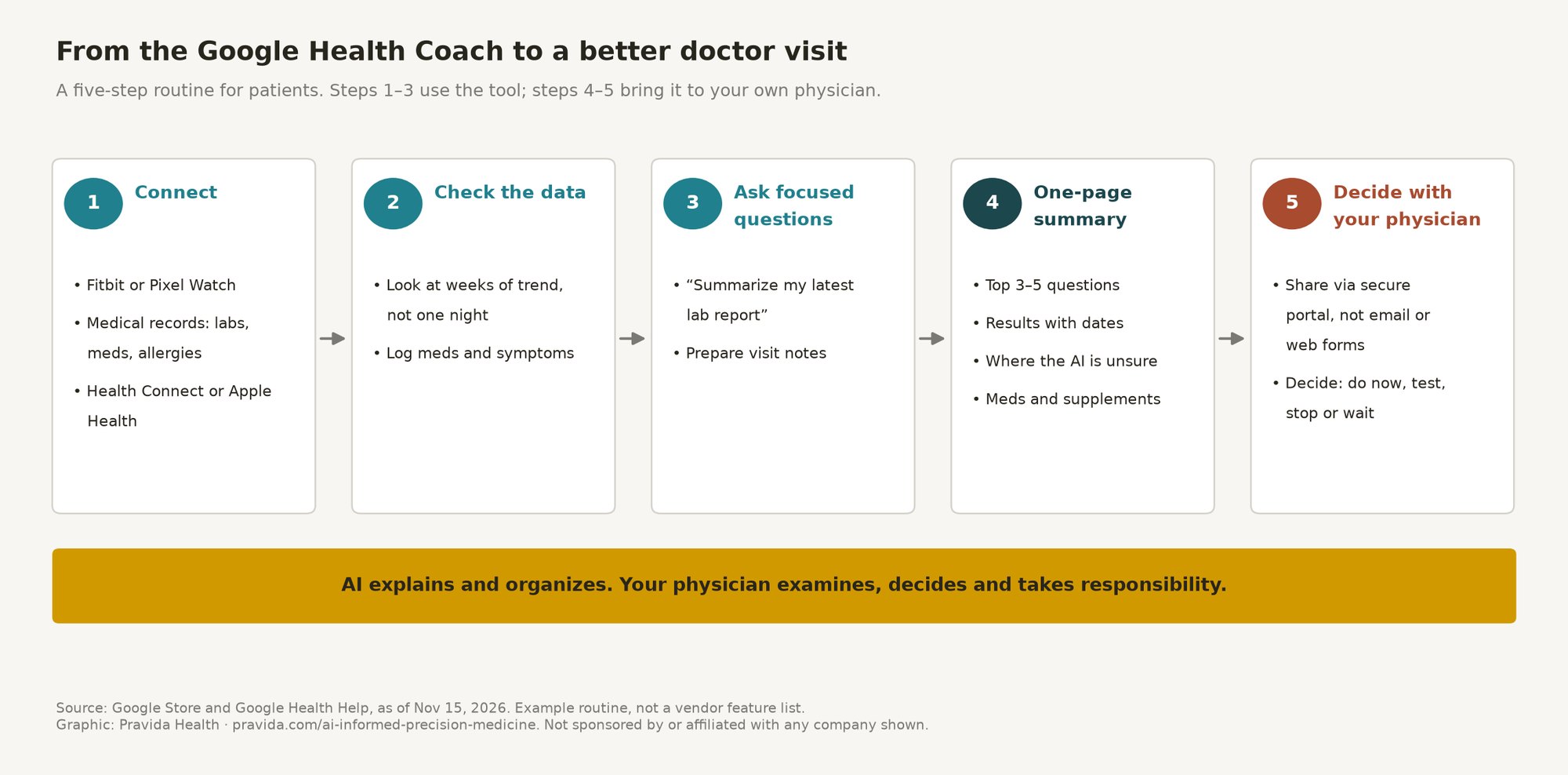
How to bring Google Health Coach work to your physician
The most useful thing you can bring to a visit is not a long chat transcript. It is a short, honest summary that separates what your records show from what the AI suggested. Here is the routine I recommend to my own patients:
- Check the data first. Before you ask anything, look at what the tool pulled in. Records can be incomplete or out of date, and a medication you stopped last year may still be listed.
- Ask your questions, then ask for the summary. Use the prompt below at the end of your conversation so the AI lists its own uncertainty.
- Add what the AI does not know. Symptoms you haven’t typed in, family history, supplements and anything that happened outside the records.
- Share it securely. Bring it to the visit or upload it through your physician’s patient portal. Don’t send health details by regular email or a website form.
- Let the visit decide. Your physician’s job is to decide which of the AI’s ideas apply to you, what to test, what to stop and what can wait.
One-page physician summary prompt (from our visit preparation guide; works in any of these tools)
“I’m preparing for a visit with my physician. Using only what we’ve discussed and the health information I’ve shared with you, write a one-page summary for my doctor with these sections: 1. My top 3–5 questions, in priority order. 2. Relevant results or data (with dates and units), and what changed over time. 3. What you suggested I consider, and how confident you are in each suggestion. 4. What you could not determine without an exam, testing, or my full history. 5. My current medications and supplements, as I’ve told you. Keep it under one page. Do not add diagnoses. Mark anything uncertain as uncertain.”
The AI health tools series
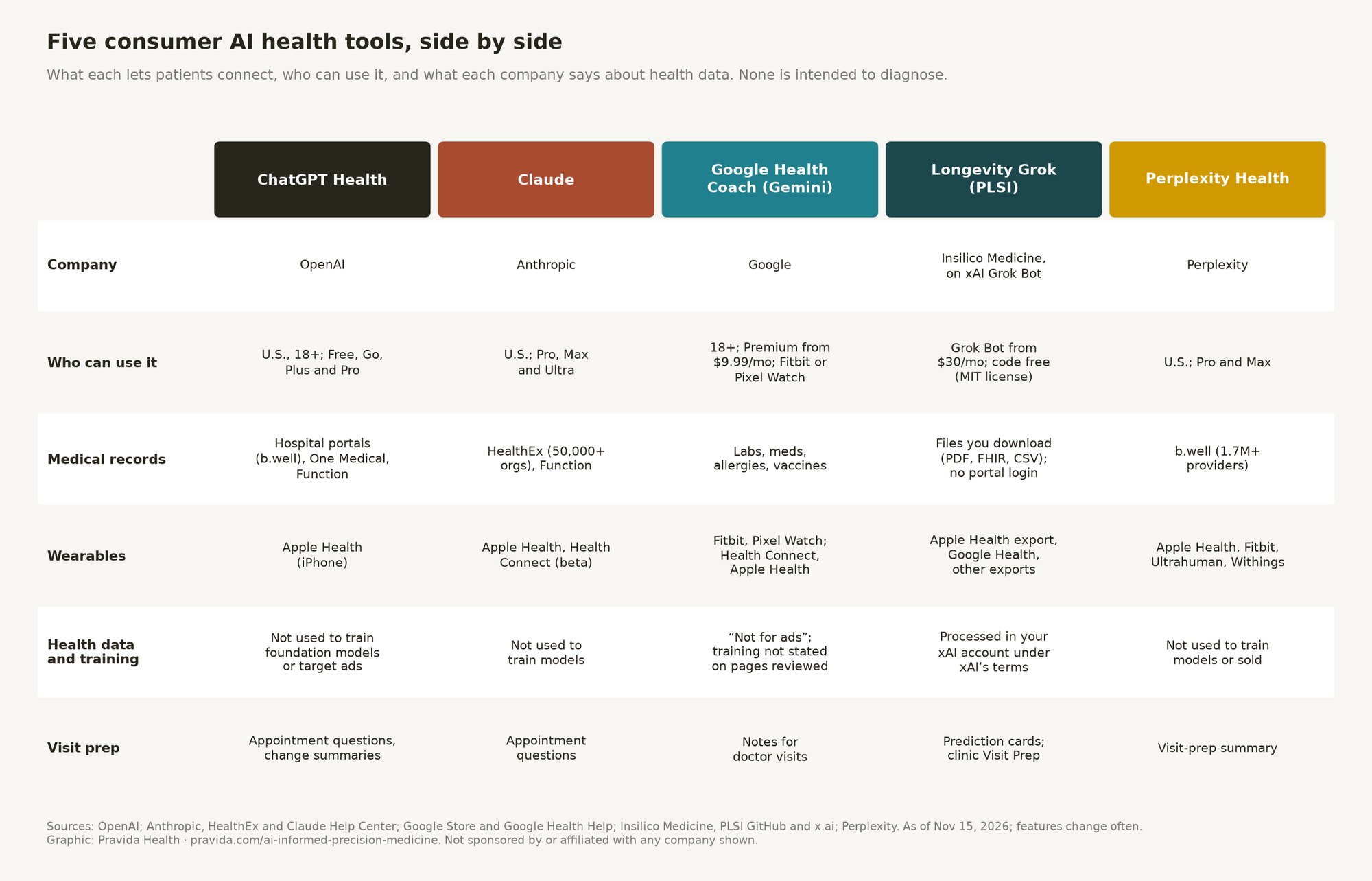
This post is part of a five-part series on what patients can do with consumer AI health tools to work better with their own physicians. The others:
For the health-system side, see Gemini for healthcare vs. OpenAI, Anthropic, Amazon and Microsoft. For how I work with patients who bring AI research to a visit, see AI-Informed Precision Medicine at Pravida.
Bring your AI research to a physician who uses these tools
Pravida’s AI-Informed Precision Medicine consultation is built for patients who have already done the research. You upload your one-page AI summary, recent labs and wearable exports through our secure patient portal. Dr. Turner reviews them before the visit, then works through them with you.
- Free 15-minute discovery call with our care coordinator
- Virtual consultation: 45 minutes, $295 (adults located in Georgia or Florida during the visit)
- In-person consultation in Midtown Atlanta: 60 minutes, $495
- You leave with prioritized recommendations: what to do now, what to test, what to stop and what can wait
Please don’t send health details through our website form or email; you’ll get a secure portal link after booking. Details and credit terms are on the consultation page.
Pravida Health, 1801 Peachtree St NE, Suite 150, Atlanta, GA 30309. Call 404-900-7371, email info@pravida.com or request an appointment.
Frequently asked questions
Is Gemini for healthcare available to patients?
No. Gemini for healthcare, launched by Google Cloud on November 10, 2026, is an enterprise product for hospitals, health systems and health plans. For patients, Gemini is built into the Google Health Coach in the Google Health app.
What is the Google Health Coach?
It is a Google Health Premium feature built with Gemini that gives personalized guidance on fitness, sleep, nutrition and mindfulness using your wearable data, what you tell it and, where available, your medical records.
How much does the Google Health Coach cost?
Google’s U.S. store lists Google Health Premium starting at $9.99 a month. The coach also requires a Fitbit or Pixel Watch and age 18 or older.
Can the Google Health Coach read my lab results?
Google says Premium can connect and display medical records, including clinical lab results, vaccinations, medications and allergies, summarize lab reports and help you prepare notes for doctor visits.
Does Google use my health data for ads?
Google’s store page says Google Health data is “not for ads.” The pages I reviewed did not say whether coach conversations are used to train Gemini, so check Google’s current privacy notice.
References
- Google Health Premium product page. Google Store.
- Get started with the Google Health Coach. Google Health Help.
- What is new with the redesigned Google Health app. Google Health Help.
- Google Health Coach. Google Health.
- Introducing Gemini for healthcare. November 10, 2026. Google Cloud Blog.