
Key takeaways
- Claude’s personal health features are for U.S. paid subscribers. Anthropic announced them on January 11, 2026 for Pro and Max users; Claude’s current help pages also list the Ultra plan.
- Medical records come in through HealthEx. HealthEx says it connects records from more than 50,000 provider organizations and is an approved vendor under TEFCA, the federal record-sharing framework.
- Setup asks more of you, on purpose. You verify your identity with CLEAR and log in to each patient portal before records are retrieved.
- Anthropic says it does not train on your health data. Health data from these connectors is not used to train models, and Apple Health data is read-only.
- Use it to explain, organize and prepare. Claude is not a medical device. Bring its summary to a physician who can decide what applies to you.
A health tool that asks you to prove who you are
Of the consumer AI health tools in this series, Claude’s medical-record setup asks the most of you. Before HealthEx retrieves a single record, you verify your identity with a selfie and a government ID through CLEAR, then log in to each patient portal one at a time. That takes a few extra minutes. As a physician, I see it as a reasonable trade for a tool that will be reading your chart.
This post covers what Claude can do with your health information as of November 15, 2026, how to set it up, and how to turn it into a better visit with your own physician.
What Anthropic launched for patients
Alongside its enterprise healthcare tools, Anthropic introduced integrations “designed to make it easier for individuals to understand their health information and prepare for important medical conversations with clinicians” (Anthropic). In the U.S., Pro and Max subscribers can connect lab results and health records through the HealthEx and Function connectors, and Apple Health and Android Health Connect through the Claude mobile apps, all initially in beta (Anthropic).
Anthropic says that once connected, Claude can summarize your medical history, explain test results in plain language, detect patterns across fitness and health metrics, and prepare questions for appointments. “The aim,” it says, “is to make patients’ conversations with doctors more productive” (Anthropic).
What you can connect
| Connector | What it adds | Notes |
|---|---|---|
| HealthEx | Records across your providers: conditions, labs, medications, notes | U.S. only; Pro, Max and Ultra; set up on Claude.ai or the desktop app, not mobile |
| Function | Lab results from Function testing | Beta at launch |
| Apple Health | Activity, workouts, vitals, body measurements, sleep, nutrition | iOS app; beta; read-only, Claude cannot change entries |
| Android Health Connect | Health and fitness data on Android | Android app; beta at launch |
Details come from Anthropic’s announcement and Claude’s help pages (Anthropic; Claude Academy; Claude Help Center).
How the HealthEx setup works
In Claude.ai or the desktop app, go to Settings, then Connectors, find HealthEx and click Connect. HealthEx then walks you through CLEAR identity verification, consent and portal logins. You authorize HealthEx to access records on your behalf for up to one year and can withdraw consent at any time. Retrieval can take 10 to 30 minutes, and HealthEx emails you when your records are ready (Claude Academy). HealthEx says CLEAR does not share your biometric or ID information with Claude (Claude Academy).
Six things patients can do with it before a visit
- Get a one-screen history. “Show me a summary of my health records” is one of the example prompts HealthEx and Claude suggest (Claude Academy). Check it against what you know. Missing diagnoses are common.
- Understand your most recent labs. Ask what each abnormal value means, what usually causes it, and what it would take to know whether it matters for you.
- Find patterns across providers. HealthEx pulls from several health systems, so Claude can notice a trend that no single portal shows, like a slowly rising A1c across two clinics.
- Look at activity and sleep trends. With Apple Health connected, Claude can chart steps, resting heart rate, HRV and sleep over time (Claude Help Center). These are signals to discuss, not diagnoses.
- Draft questions for your next visit. “What questions should I ask my doctor at my next visit?” is another suggested prompt (Claude Academy). Ask it to rank them.
- Ask it where it is unsure. Anthropic says Claude is designed to acknowledge its uncertainty and direct users to healthcare professionals (Anthropic). Use that. Ask it directly what it cannot tell from the records.
Privacy and control: what Anthropic and HealthEx say
- Training: Anthropic says it does not use users’ health data to train models (Anthropic). HealthEx says integrated health data is not used for training or stored in Claude’s memory (HealthEx).
- Granular permissions: you choose which categories Claude can access, such as conditions, labs, medications and notes, and can turn access off at any time (HealthEx).
- Minimum necessary: HealthEx says Claude retrieves only the portions of your record needed to answer each question (HealthEx).
- Apple Health: Claude reads health data only when you ask a question that needs it, cannot write to Apple Health, and does not save health information to memory by default (Claude Help Center).
As with any consumer app, HIPAA generally does not apply to Claude the way it applies to your medical practice. Your protection comes from these companies’ terms and the permissions you set.
Where it falls short
Claude’s help center is blunt: Claude is not a medical device and cannot provide medical guidance (Claude Help Center). The features are still labeled beta, the tools require a paid plan, and there are no published data showing that patients who use them get better outcomes. Records pulled from portals also have gaps. Outside imaging, older paper records and the supplements you take often aren’t there.
The bigger risk is subtle. A well-written summary can feel complete when it isn’t. Treat Claude’s output as a draft for your physician to check, not a second opinion.
How to bring Claude work to your physician
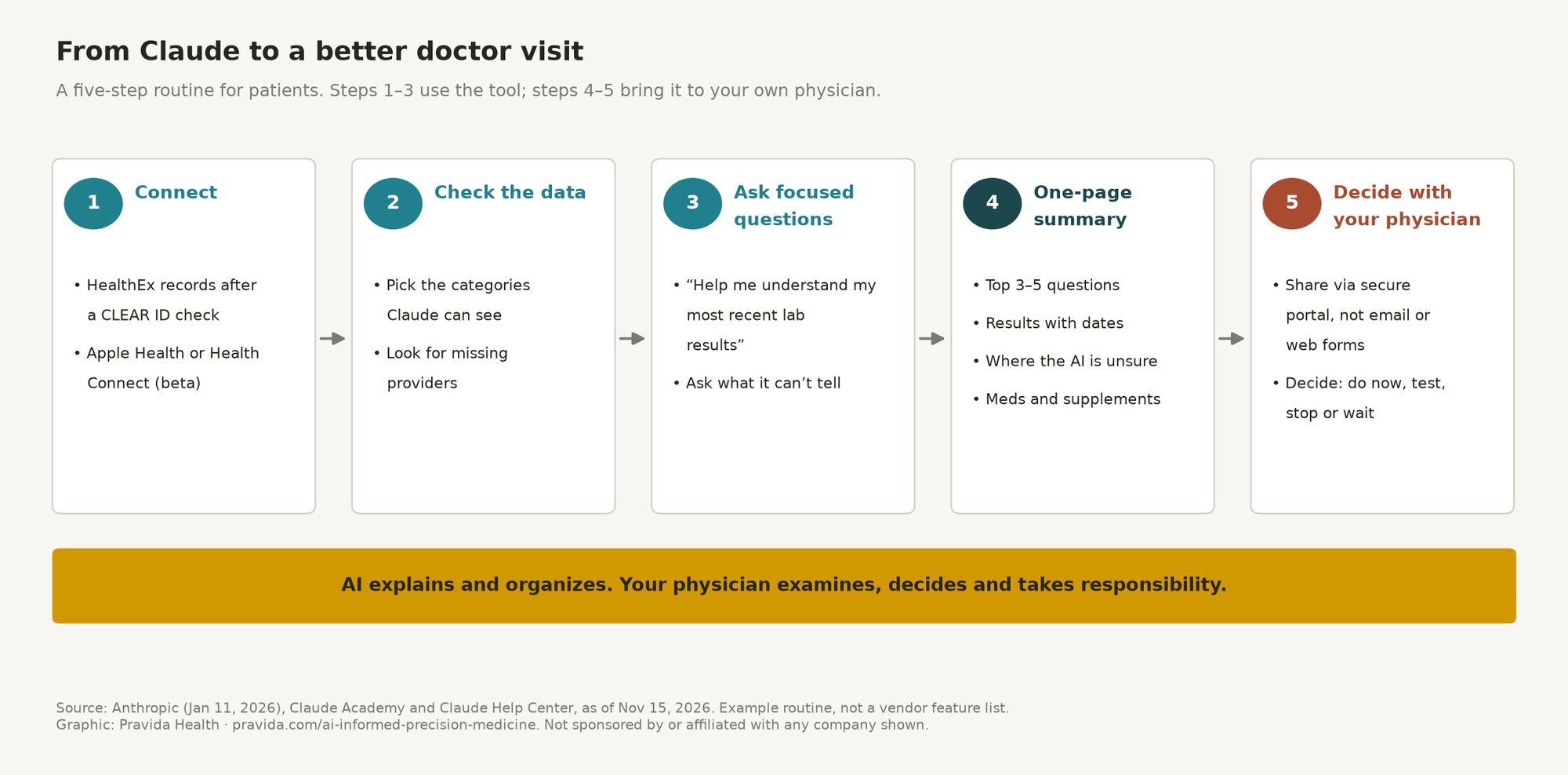
The most useful thing you can bring to a visit is not a long chat transcript. It is a short, honest summary that separates what your records show from what the AI suggested. Here is the routine I recommend to my own patients:
- Check the data first. Before you ask anything, look at what the tool pulled in. Records can be incomplete or out of date, and a medication you stopped last year may still be listed.
- Ask your questions, then ask for the summary. Use the prompt below at the end of your conversation so the AI lists its own uncertainty.
- Add what the AI does not know. Symptoms you haven’t typed in, family history, supplements and anything that happened outside the records.
- Share it securely. Bring it to the visit or upload it through your physician’s patient portal. Don’t send health details by regular email or a website form.
- Let the visit decide. Your physician’s job is to decide which of the AI’s ideas apply to you, what to test, what to stop and what can wait.
One-page physician summary prompt (from our visit preparation guide; works in any of these tools)
“I’m preparing for a visit with my physician. Using only what we’ve discussed and the health information I’ve shared with you, write a one-page summary for my doctor with these sections: 1. My top 3–5 questions, in priority order. 2. Relevant results or data (with dates and units), and what changed over time. 3. What you suggested I consider, and how confident you are in each suggestion. 4. What you could not determine without an exam, testing, or my full history. 5. My current medications and supplements, as I’ve told you. Keep it under one page. Do not add diagnoses. Mark anything uncertain as uncertain.”
The AI health tools series
This post is part of a five-part series on what patients can do with consumer AI health tools to work better with their own physicians. The others:
For the health-system side, see Gemini for healthcare vs. OpenAI, Anthropic, Amazon and Microsoft. For how I work with patients who bring AI research to a visit, see AI-Informed Precision Medicine at Pravida.
Bring your AI research to a physician who uses these tools
Pravida’s AI-Informed Precision Medicine consultation is built for patients who have already done the research. You upload your one-page AI summary, recent labs and wearable exports through our secure patient portal. Dr. Turner reviews them before the visit, then works through them with you.
- Free 15-minute discovery call with our care coordinator
- Virtual consultation: 45 minutes, $295 (adults located in Georgia or Florida during the visit)
- In-person consultation in Midtown Atlanta: 60 minutes, $495
- You leave with prioritized recommendations: what to do now, what to test, what to stop and what can wait
Please don’t send health details through our website form or email; you’ll get a secure portal link after booking. Details and credit terms are on the consultation page.
Pravida Health, 1801 Peachtree St NE, Suite 150, Atlanta, GA 30309. Call 404-900-7371, email info@pravida.com or request an appointment.
Frequently asked questions
Can Claude read my medical records?
Yes, if you are a U.S. Claude Pro, Max or Ultra subscriber and connect HealthEx. You verify your identity with CLEAR, log in to your patient portals and consent before records are retrieved. You can limit categories or disconnect at any time.
What is HealthEx?
HealthEx is a service that lets individuals access and share their health records. It says it connects records from more than 50,000 provider organizations and is an approved vendor under TEFCA, the federal framework for sharing health records.
Does Anthropic train Claude on my health data?
Anthropic says it does not use users’ health data to train models. HealthEx says integrated health data is also not stored in Claude’s memory.
Does Claude work with Apple Health?
Yes, in beta on the iOS app for U.S. Pro, Max and Ultra users. Claude can read activity, workout, vitals, body-measurement, sleep and nutrition data you allow, but it cannot change your Apple Health entries.
Can Claude replace my doctor?
No. Claude’s help center says it is not a medical device and cannot provide medical guidance. Use it to understand your records and prepare questions, then make decisions with a physician.
References
- Advancing Claude in healthcare and the life sciences. January 11, 2026. Anthropic.
- Using the HealthEx connector in Claude. Claude Academy.
- Anthropic partners with HealthEx. January 11, 2026. HealthEx.
- Use Claude with iOS apps (Health section). Claude Help Center.